Output workflows can invoke any app a user has authorized in their Zapier account without writing OAuth or refresh-token code. The Zapier SDK resolves the user’s existing connection and exposes typed actions; Output wraps each call in a step() so it’s traced, retried, and safe to replay.

What it enables

  • Access hundreds of third-party apps (Slack, Gmail, Airtable, HubSpot, …) through a single SDK.
  • Zero OAuth code — Zapier injects tokens from the user’s stored connection.
  • Two ways to execute actions: a unified runAction() entry point, or dot notation to access app-specific methods.
  • Machine credentials that run from a headless worker, not a browser.

When to use

  • You need to send, read, or update data in an app a user has already authorized in Zapier.
  • You want to skip managing OAuth tokens and refresh flows yourself.
  • Your workflow should tolerate transient 5xxs and retry without double-posting.
  • You need the Zapier call traced alongside LLM and other steps in the same Output execution.

Install & authenticate

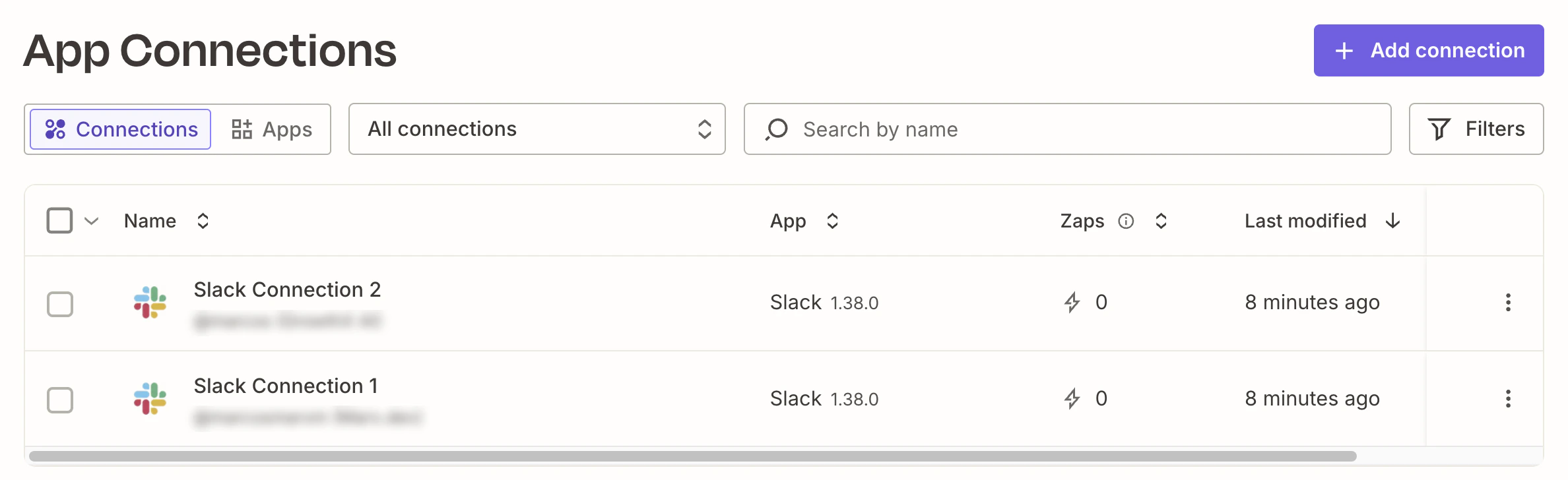
Visit https://zapier.com/app/assets/connections and create connections to the apps you want to use. Zapier App Connections page listing authorized Slack workspaces Then install the Zapier SDK:
npm install @zapier/zapier-sdk
npm install -D @zapier/zapier-sdk-cli @types/node typescript
Your package.json must set "type": "module" — both SDKs are ESM. Authenticate once locally and register the apps you want to call:
npx zapier-sdk login          # one-time browser OAuth
npx zapier-sdk add slack      # writes .zapier-manifest.json
Adding an app installs a typed system, so you can access it through dot notation with typed return values.

Machine credentials for the worker

The Output worker runs in Docker with no browser. Create machine credentials and store them in Output’s encrypted credential store:
npx zapier-sdk create-client-credentials output-ai
npx output credentials edit
zapier:
  client_id: zap_cc_xxxxxxxx
  client_secret: zap_cs_xxxxxxxx
You also need to update your .env:
# Zapier credentials
ZAPIER_CLIENT_ID=credential:zapier.client_id
ZAPIER_CLIENT_SECRET=credential:zapier.client_secret

Shared Zapier client

Put the configured SDK in its own file under src/clients/ so every step imports the same instance — matching the API client pattern used elsewhere in Output (e.g. src/clients/jina.ts):
src/clients/zapier.ts
import { credentials } from '@outputai/credentials';
import { createZapierSdk } from '@zapier/zapier-sdk';


const clientId = credentials.require('zapier.client_id') as string;
const clientSecret = credentials.require('zapier.client_secret') as string;

export const zapier = createZapierSdk({
    credentials: { clientId, clientSecret },
});

Schemas

Define every step and workflow boundary in types.ts so the same shapes are reused across files instead of being inlined into each z.object(...):
types.ts
import { z } from '@outputai/core';

export const WorkflowInputSchema = z.object({
  topic: z.string(),
  channel: z.string(),
});

export const WorkflowOutputSchema = z.object({
  message: z.string(),
  channel: z.string(),
  ts: z.string(),
});

export const PostToSlackInput = z.object({
  channel: z.string(),
  message: z.string(),
});

export const DraftAnnouncementInput = z.object({
  topic: z.string(),
});

export const DraftAnnouncementOutput = z.object({
  message: z.string(),
});

export type WorkflowInput = z.infer<typeof WorkflowInputSchema>;
export type WorkflowOutput = z.infer<typeof WorkflowOutputSchema>;
export type PostToSlackInput = z.infer<typeof PostToSlackInput>;
export type DraftAnnouncementInput = z.infer<typeof DraftAnnouncementInput>;
export type DraftAnnouncementOutput = z.infer<typeof DraftAnnouncementOutput>;

Calling a Zapier action from a step

Each authorized app shows up on the App Connections page in Zapier — that’s what findFirstConnection queries under the hood: Put every Zapier call inside a step() so it’s traced and retried. Resolve the user’s connection, then invoke the action through the typed dot-notation API:
steps.ts
import { step, FatalError } from '@outputai/core';
import { generateText } from '@outputai/llm';
import { zapier } from '../../clients/zapier.js';
import {
  DraftAnnouncementInput,
  DraftAnnouncementOutput,
  PostToSlackInput,
  WorkflowOutputSchema,
} from './types.js';

export const postToSlackChannel = step( {
    name: 'post_to_slack_channel',
    description: 'Post message to Slack Channel',
    inputSchema: PostToSlackInput,
    outputSchema: WorkflowOutputSchema,
    fn: async ({ channel, message }) => {
    
      const { data: firstSlackConnection } = await zapier.findFirstConnection({
        search: 'Slack Connection 2', // if you have more than one app it's better to provide the complete name
        appKey: 'slack',
        owner: 'me',
        isExpired: false,
      });

      if (!firstSlackConnection) {
        throw new FatalError(
          'No authorized Slack connection. Authorize Slack in Zapier, then retry.'
        );
      }

      const slack = zapier.apps.slack({ connection: firstSlackConnection.id });
      const { data } = await slack.write.direct_message({
        inputs: { channel, text: message, as_bot: false }
      });

      const [result] = data as Array<{ ts: string; channel: string }>;
      return { ts: result.ts, channel: result.channel, message: message };
    },
});

export const draftAnnouncement = step({
    name: 'draft_announcement',
    description: 'Draft a Slack announcement message for a given topic',
    inputSchema: DraftAnnouncementInput,
    outputSchema: DraftAnnouncementOutput,
    fn: async ({ topic }) => {
      const { text } = await generateText({
        prompt: 'draft_announcement',
        variables: { topic },
      });

      return { message: text.trim() };
    },
});
Write the prompt to generate the message:
---
provider: anthropic
model: claude-sonnet-4-6
temperature: 0.7
---

<system>
You are a concise, friendly internal communications writer. You draft short Slack
announcements (1–3 sentences) that are clear, warm, and skimmable. Use plain
language, no buzzwords, and no hashtags. End with a single celebratory emoji
when appropriate.
</system>

<user>
Draft a Slack announcement for the team about the following topic:

{{ topic }}

Return only the message text — no preamble, no quotation marks.
</user>
A missing connection throws FatalError — retrying won’t help until the user authorizes Slack in Zapier. Transient 5xxs from Slack or Zapier bubble up and Output’s step retry policy handles them automatically.

Other methods to call Zapier Actions

You can also invoke the action using this syntax:
      const { data } = await zapier.runAction( {
        appKey: 'slack',
        actionType: 'write',
        actionKey: 'send_channel_message',
        connectionId: firstSlackConnection.id,
        inputs: { channel, text: message },
      } );
Always destructure { data } from the response — the Zapier SDK returns a wrapped envelope.
For endpoints with no built-in action, fall back to zapier.fetch() — it injects the user’s credentials and returns a standard Response:
const response = await zapier.fetch('https://slack.com/api/users.list', {
  method: 'GET',
  connectionId: firstSlackConnection.id,
});
const users = await response.json();
Direct API calls bypass your org’s action restriction policies. See Zapier’s docs.

Orchestrating with a workflow

Keep the workflow pure — it only sequences step calls. No SDK clients, no fetch, no Date.now:
workflow.ts
import { workflow } from '@outputai/core';
import { draftAnnouncement, postToSlackChannel } from './steps.js';
import { WorkflowInputSchema, WorkflowOutputSchema } from './types.js';

export default workflow({
  name: 'slack_broadcast',
  inputSchema: WorkflowInputSchema,
  outputSchema: WorkflowOutputSchema,
  fn: async ({ topic, channel }) => {
    const { message } = await draftAnnouncement({ topic });
    const { ts } = await postToSlackChannel({ channel, message });
    return { message, channel, ts };
  },
});
Define a scenario file so runs are reproducible and reviewable in PRs:
src/workflows/slack_broadcast/scenarios/happy_message.json
{
  "topic": "we shipped v1.2",
  "channel": "#test-zapier-sdk"
}
Run the workflow against that scenario:
npx output workflow run slack_broadcast happy_message
The Output trace captures each step independently, including the full Zapier request and response inside postToSlackChannel.